Court Reserve
The Mobile Tennis Center is using COURT RESERVE as our main platform!!
We are now requiring that people sign up for a FREE membership. This membership allows the member to book courts, pay for private lessons, and sign up for clinics.
MEMBERSHIP SIGN UP INSTRUCTIONS
How to sign up
Click HERE to sign up or follow the QR code on your phone
Once you click the membership type that applies to you, please fill out all the requested information. Please fill out the Primary Household's Information only. You are able to add Family onto your account for free. To do this please follow the instructions below.
ADDING FAMILY MEMBERS
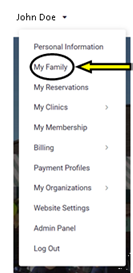
1. Once you have created your accout, hover your mouse over your name in the top right coner of the screen

2. Click on My Family
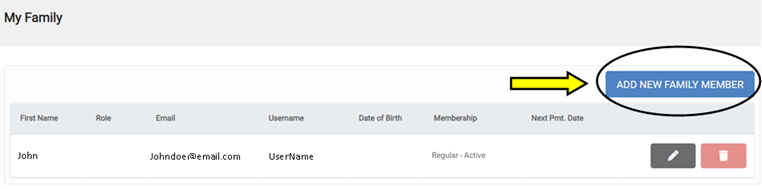
3. Click on Add New Family Member
4. Fill out all information requested